FreePrints Photobooks
- 4.8
- Rating
- 1.00M
- Installs
- Free
- Price

 Analysis by App-foxy
I tend to think of a photo book as a small project that sounds easy until the moment you try to finish it. The pictures are scattered across a phone, some are duplicates, a few need cropping, and the best memories are often mixed with screenshots and accidental shots. FreePrints Photobooks, a free photography app from PlanetArt, is built around making that process feel more manageable on a mobile device. After spending time with it, I see its main appeal in the gap between a camera roll and a physical keepsake: it gives your photos a more purposeful destination than simply leaving them in a gallery.
The app is aimed at people who want to turn selected images into a photobook without treating the task like a full design project. That distinction matters. I would not choose it when I want complete control over typography, page geometry, or a highly customized layout. I would choose it when I have a family trip, a child’s milestone, a pet’s first year, or a collection of everyday moments and want a practical way to organize them into something I can look through away from the phone.
What the app feels like in real use
FreePrints Photobooks is listed in the Photography category, and its role is quite focused: it helps move personal images from a mobile collection toward a printed book. The experience is less about editing individual photographs artistically and more about selecting, arranging, and reviewing a group of images as one story. That makes it approachable for someone who does not want to learn a complicated design tool.
You May Also Like

 Blood Strike: 2.5 Anniversary
Blood Strike’s Loadouts Turn Every Drop Into a Tactical Gamble
A close look at Blood Strike’s custom loadouts: how fast access to signature weapons reshapes its battle royale rhythm, rewards preparation, and narrows the gap between fights.

 Pandora - Music & Podcasts
Pandora’s Music Is Easy to Start, but Harder to Recover
Pandora’s strength is its low-effort path from a seed to a station. Its weak spot is how much confidence it asks you to place in connection, setup, and quiet recovery.

 8 Ball Pool
 Is Built on Rivalries, Rematches, and Routine
A close look at the rivalries, rematches, shared routines, and unanswered safety questions that turn a quick pool match into a persistent mobile community.

 Samsung Music
’s Quiet Strength Is Playing What You Already Own
Its reach comes less from spectacle than from dependable access to a personal library. That simplicity is both the app’s strongest retention engine and its ceiling.

 AccuWeather: Weather Radar
AccuWeather Review: A Quick, Clear Forecast for Everyday Decisions
For everyday plans, the best forecast is the one you can understand quickly. AccuWeather makes rain timing, radar, and local conditions easy to act on, with a few trade-offs.

 Hill Climb Racing
Why Hill Climb Racing Still Turns Crashes Into One More Run
A tiny car, a bumpy hill and one more upgrade: Hill Climb Racing keeps resurfacing because its simple chaos makes every near-miss feel personal.
More From Our News Desk



My first useful observation is that the quality of the result depends heavily on the selection stage. The app can help present photos as a book, but it cannot rescue a collection filled with near-identical images, blurry shots, or pictures with distracting backgrounds. I got better results when I made a rough shortlist before trying to complete the project. A simple rule worked well: keep one strong image from a repeated moment, then add a wider scene, a close-up, and a human reaction where possible. That gives the finished book a sense of movement instead of making every page feel like a duplicate.
The interface is most appealing when I treat it as a guided workflow rather than a blank canvas. A blank canvas invites endless adjustment; a guided photo-book process encourages completion. For grandparents, busy parents, travelers, and anyone who takes many pictures but rarely prints them, that lower creative burden is a genuine advantage. You can concentrate on which memories deserve space instead of spending the whole evening deciding where every element should go.
At the same time, convenience comes with a trade-off. People who enjoy precise visual control may find the experience restrictive compared with a dedicated layout app or a desktop publishing tool. If your goal is a carefully art-directed portfolio, a wedding album with strict visual rules, or a book built around custom captions and elaborate page designs, I would look elsewhere. This app makes more sense for personal storytelling than for professional presentation.
Why the internet matters during the project
The most important practical issue is connectivity. A photo-book project involves browsing images, preparing a larger collection, and moving through a process that is more demanding than casually viewing a few pictures. In my experience, this is the kind of task I prefer to start on a reliable home or office connection rather than while walking through a station or relying on an unstable mobile signal.
A weak connection can turn a pleasant selection session into a stop-and-start chore. Images may take longer to appear, transitions can feel less responsive, and the point at which a project is being prepared or submitted becomes more stressful when the network keeps dropping. I would avoid beginning a book immediately before leaving the house, especially if the camera roll contains a large number of images. The app is much easier to judge when the connection is not adding friction to every decision.
This also changes how I plan a project. I first identify the occasion, gather likely images, and remove obvious duplicates in the phone’s normal gallery. Then I open the app when I have enough time to review the book calmly. That two-stage approach is more efficient than trying to discover, sort, and arrange everything in one rushed session. It also reduces the chance that a temporary connection problem interrupts the most important part of the work: choosing the right photographs.
There is a less obvious benefit to thinking about connectivity early. A photo book is a commitment, not just a quick edit. When the app is used in a stable setting, I am more likely to inspect the whole sequence, notice a repeated image, and catch a photo that does not fit the story. On a poor connection, I am tempted to accept the first workable arrangement just to finish. The network therefore affects not only speed, but also the care I put into the final result.
Using it in ordinary mobile situations
The app suits mobile life because the source material is usually already on the phone. I can imagine using it after a weekend away, during a child’s birthday week, or while sorting photos from a family gathering. Those are situations where a computer may be available but is not necessarily where the memories are stored. Starting with the phone removes the need to transfer everything before deciding whether the project is worth making.
A realistic example is a short family trip. I might return with several hundred pictures, including food, landscapes, group shots, and many versions of the same pose. Rather than trying to make a book from everything, I would choose a small visual route through the trip: departure, arrival, key places, people, an unexpected detail, and the journey home. The app then becomes a way to preserve the shape of the experience instead of dumping the entire camera roll into a printed format.
Another useful situation is a recurring personal record. Someone could create a book around a child’s first school year, a pet’s changing habits, or monthly family gatherings. The strength here is emotional rather than technical. A printed sequence can make ordinary photos feel important, particularly when the images are not individually spectacular but collectively show change over time.
I would be more cautious about using it in public places with an unreliable connection. A café, airport, or crowded event may be convenient for browsing, but it is not necessarily the best environment for a long photo-selection session. Glare, interruptions, limited battery, and inconsistent network performance can all make the process less comfortable. My preferred workflow is to collect ideas anywhere, then do the serious arrangement when I am settled.
The app runs on an operating system version of 10 or later, which is worth checking before installing it on an older device. On a supported phone, the larger concern is not age alone but how comfortably the screen handles a detailed visual review. A small display can make it harder to notice subtle cropping problems or decide whether two similar photos are genuinely different. If the project matters, I recommend reviewing each page slowly rather than trusting a quick scroll.
What happens when a project goes wrong
Photo projects rarely fail because of one dramatic problem. More often, the trouble comes from small mistakes: selecting a weak image, overlooking a duplicate, missing an awkward crop, or losing momentum when the connection becomes unreliable. FreePrints Photobooks is easiest to use when I treat review as a separate phase instead of assuming that the first arrangement is ready.
Before I consider a book finished, I look at it in sequence rather than jumping between individual pages. I ask whether the opening image establishes the occasion, whether the middle becomes repetitive, and whether the final images provide a natural ending. This is a more useful check than simply asking whether every photograph is technically sharp. A slightly imperfect candid shot may belong in the story, while a technically clean image can still feel irrelevant.
One of my favorite practical habits is keeping a temporary “maybe” group outside the final selection. I do not force every possible image into the book. I first choose the essential pictures, then return to the extras only if a page feels empty or the story needs a transition. This prevents the common mistake of filling space with weaker photos just because they are available.
If the app becomes difficult to use during a network interruption, I would not repeatedly tap through the same step and hope the project has registered every action. I would pause, confirm what is still visible, and return when the connection is stable. That may sound cautious, but it avoids creating uncertainty about whether a selection or change was accepted. The safest approach for any important photo project is to make decisions deliberately and check the complete result before finishing.
Recovery is also easier when the original images remain organized in the phone’s regular gallery. I would never treat the app as the only place where my chosen photos exist. Keeping a clearly named album for the project means I can reconstruct the selection if I need to revisit it. This is especially useful for annual books or family projects that may be edited over more than one sitting.
The app’s current version is 3.11.1, and it has been available since March 28, 2016. That longer presence gives it the feel of an established tool rather than a novelty, but I still recommend checking that the installed version behaves properly on your particular phone before investing time in a large project. A small trial book or a modest first selection is a sensible way to learn the workflow without making the first attempt unnecessarily complicated.
Managing photos and mobile data sensibly
Because this is a photography app, data-conscious use is less about avoiding the service entirely and more about choosing the right moment and network. A large photo collection can make a mobile session more demanding than ordinary text-based app use. If I am working with travel pictures or a long family archive, I prefer a dependable Wi-Fi connection and enough battery to review the project without interruption.
I also avoid opening the process with every image in a camera roll. Narrowing the collection first has three advantages: it reduces visual clutter, makes the final story stronger, and avoids spending time moving through photos that were never serious candidates. This is one of the simplest ways to make the experience feel faster without changing any settings. The best optimization is often better preparation.
Another useful habit is separating original photographs from edited copies. If I have brightened, cropped, or filtered an image in another app, I make sure I know which version I am selecting. A phone gallery can contain several nearly identical files, and choosing the wrong one may only become obvious when the book is being reviewed. A dedicated album with final candidates helps prevent that confusion.
I would also be careful with shared or public networks when handling personal family photographs. The app is intended for personal photo projects, and common sense still matters: I prefer a connection I trust, keep the phone locked when I step away, and avoid rushing through a submission while distracted. These are not glamorous tips, but they protect the quality of the project and make the process less stressful.
Storage and organization matter too. Even when the final goal is a physical book, the phone still needs to manage the selected images and any versions created during editing. I would clear obvious duplicates before starting and keep especially important pictures backed up through my normal photo-storage routine. That way, the book project remains one use of the images, not the only copy or the only place where the selection exists.
How it compares with other ways to make a photo book
The usual alternatives fall into three broad groups: printing individual photos, using a more advanced design service, or doing nothing beyond keeping images in a gallery. FreePrints Photobooks sits between those choices. Individual prints are better when I want to frame a few standout images, but they do not tell a complete story. A phone gallery is convenient for storage, but it rarely creates the same sense of occasion as a physical sequence.
A full design tool offers more freedom. I could control every page, add a particular visual identity, and build a more formal album. That flexibility is valuable for professional work or an event where presentation has to follow a precise style. The cost is time and decision fatigue. I would not trade that control away for a major client project, but I am happy to trade it away for a family book that I want to finish without learning a publishing system.
The app’s free price makes it easy to try, and its Everyone age rating makes it suitable as a broadly accessible family photography tool. Its popularity is also substantial, with an average rating of 4.8 from around 50 thousand ratings and over 1 million installs. Those figures suggest that the basic idea resonates with many users, although popularity does not remove the need to check whether the workflow matches your expectations.
For me, the deciding question is not whether it has every advanced option. It is whether it helps me complete a meaningful project. If I want a quick route from a messy camera roll to a coherent keepsake, it is a sensible choice. If I want exact control over every element, a specialized layout app remains the better fit. If I only need a handful of images printed, individual photo printing may be simpler and more appropriate.
Who should use it and who should skip it
I would recommend FreePrints Photobooks to someone who takes plenty of photos but rarely turns them into anything tangible. It is particularly well suited to family memories, holidays, birthdays, school milestones, pet photos, and small personal collections. The app lowers the barrier between “I should make an album” and actually beginning one, which is often the hardest part.
It is also a good match for people who prefer making decisions on a phone. The experience feels natural when the phone is already the place where photographs are captured, reviewed, and organized. Users who dislike complicated creative software may appreciate the narrower purpose because it keeps the project focused.
I would skip it if the book needs a strict professional layout, extensive text, highly specific branding, or detailed control over every visual choice. I would also hesitate if my connection is frequently unreliable and I cannot plan sessions around a stable network. The app is not the right answer for every printing need, and choosing it only because it is free could lead to disappointment if the desired result is a custom-designed publication.
One more point is worth considering: a good photo book requires editing judgment from the user. The app can make the process more convenient, but it does not replace the work of deciding what belongs together. People who expect an automatic transformation of an entire camera roll may find the selection stage more involved than the short description suggests. I think that is a fair trade, because the personal choices are what make the finished book feel like yours.
My final view on the connected experience
After using it as a mobile photography tool, I see FreePrints Photobooks as a practical bridge between digital memories and a physical format. Its strongest quality is not a flashy editing trick; it is the way a focused workflow can turn an unorganized collection into a project with a beginning, middle, and end. PlanetArt has kept the idea approachable, and the free entry point makes experimentation less intimidating.
The main caution is connectivity. I would not plan to complete an important book in a rushed public setting or over an unstable mobile signal. A reliable connection, a prepared photo shortlist, and a careful final review make a noticeable difference. Those habits also expose the app’s central trade-off: it favors convenience and completion over unlimited design freedom.
My recommendation is straightforward. Try it when you want to preserve a personal occasion and would otherwise leave the photos buried in your phone. Start with a small, well-organized selection, review the sequence as a story, and use a trusted connection for the more demanding parts of the process. Its real strength is helping ordinary photographs become a finished memory rather than another forgotten folder.
With a 4.8 average and roughly 16 thousand written reviews, it has clearly earned attention from a large audience, but my advice remains based on fit rather than numbers. The app is free, rated for Everyone, and currently at version 3.11.1, so it is easy to approach as a low-risk experiment on a compatible device. I would choose it for a convenient family keepsake, not for a precision-designed professional album.
FAQs for FreePrints Photobooks
01What is FreePrints Photobooks and how does it work?
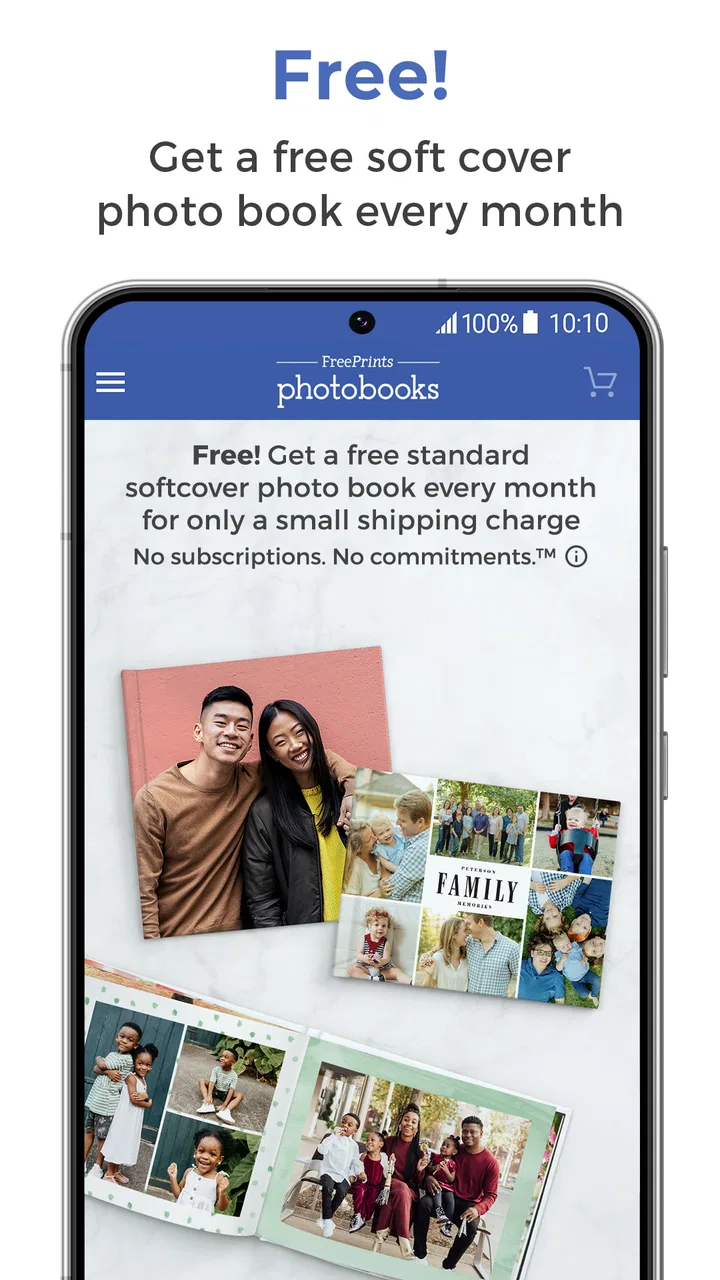
FreePrints Photobooks is a mobile application that allows users to create custom photo books directly from their smartphones. By selecting photos from your phone, Facebook, Instagram, or other sources, you can easily design a personalized photo book. Each month, you are entitled to one free 5x7 softcover photo book, paying only for shipping. Additional books or upgrades are available for purchase.
02Are there any hidden costs or subscriptions with FreePrints Photobooks?
FreePrints Photobooks does not require a subscription, and there are no hidden fees. You receive one free 5x7 photo book each month, with the only cost being for shipping and handling. If you decide to upgrade to larger sizes or add more pages, those will incur additional charges, which are clearly outlined during the order process.
03How is the quality of the photo books from FreePrints Photobooks?
The photo books from FreePrints Photobooks are of high quality, featuring vibrant colors and durable paper. Users often praise the clarity and color accuracy of the printed photos. The books are bound in softcover, which is sturdy enough for frequent handling. For those seeking higher quality, hardcover options are available at an additional cost.
04Can I customize my photo book with text and layouts?
Yes, FreePrints Photobooks offers a variety of customization options. You can select different layouts, add captions, and choose from various themes to enhance your photo book. The app includes user-friendly tools that make it easy to adjust photos, add text, and arrange pages to suit your personal style.
05Is FreePrints Photobooks available on both Android and iOS devices?
Yes, FreePrints Photobooks is available for both Android and iOS devices. The app can be downloaded from the Google Play Store for Android users and the Apple App Store for iOS users. It is compatible with most smartphones and tablets, making it convenient for users to create photo books on the go.
Pros
- Easy to use interface for quick navigation.
- High-quality print results with vibrant colors.
- Free monthly photobook option available.
- Wide range of customization features.
- Fast delivery options for urgent needs.
Cons
- Limited to one free book per month.
- Shipping costs can add up quickly.
- App can occasionally lag on older devices.
- Limited editing tools for photo enhancements.
- No option for digital photobook sharing.

FreePrints Photobooks
Gallery